Your files. Your session.
Understand the web build, the desktop engine, and where your own game files fit in.
Read the guidePick your setup. Find your line.
Skate 3 Browser puts a Rust-powered session one tab away.
An original community park.
A fresh line waiting to happen.
CLICK THE GAME TO TAKE CONTROL
Independent fan project. Experimental gameplay, not the complete EA console release.
Engine credits ↗New to Skate 3 Browser? Here’s the shortest route from a blank tab to the park.
A current desktop Chrome or Edge browser with WebGPU is a good starting point. Run the check below before loading.
Check my browserLaunch the experimental web build in this page. It starts in KenneyPark, a small original community park.
Launch the gameClick the game to focus it. Use a keyboard or connect a controller, push off, and try your first ollie.
Learn the controlsSkate 3 Browser maps keyboard input to a virtual Xbox pad. A controller gives you analog stick input, with more room to vary each movement.
Full control referenceSkate 3 Browser needs WebGPU. Run a quick local check — no files, account, or hardware report are sent by this test.
Use a current version with a supported GPU and hardware acceleration.
WebGPU availability depends on your browser version, OS and hardware. Run the check.
Touch controls exist in this build. Performance and stability vary; physical-device testing is still pending.
Understand the web build, the desktop engine, and where your own game files fit in.
Read the guideWebGPU, controllers, touch controls, and what to try when the screen stays black.
Read the guideWhat the 360 FPS claim leaves out, plus practical settings for a smoother session.
Read the guideGet to know the park, the inputs and the files before your next Skate 3 Browser session.
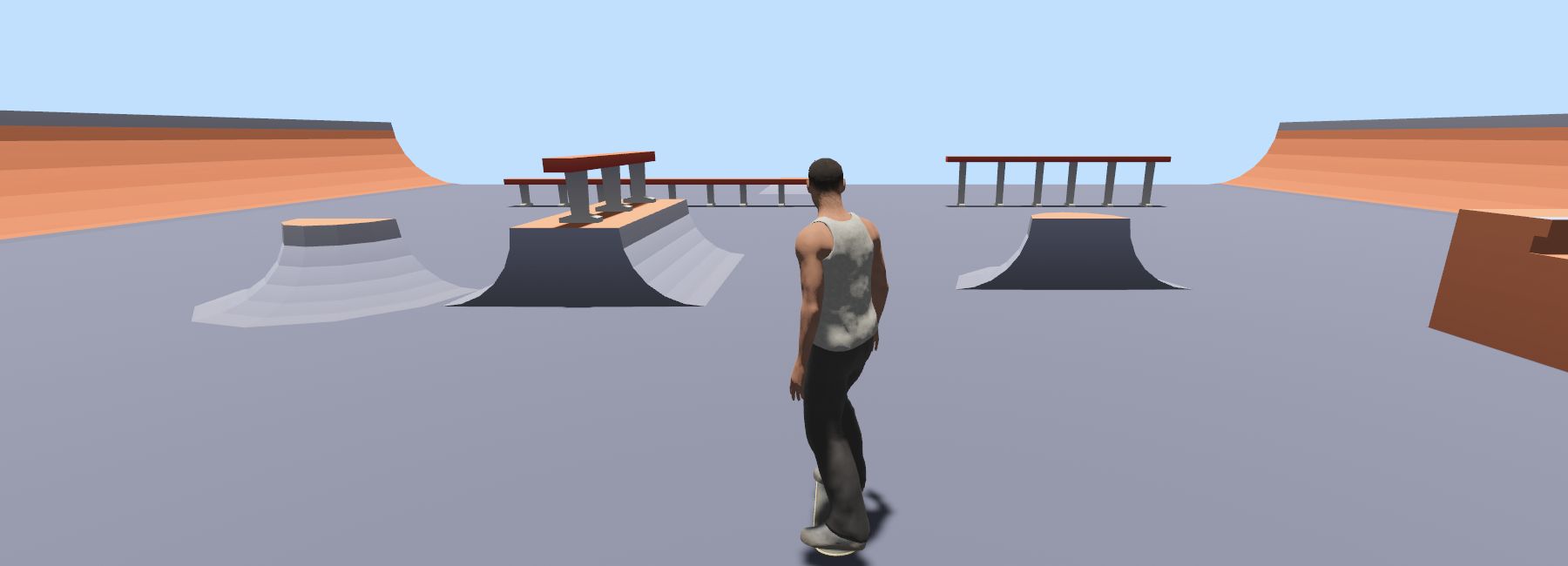 01 / KENNEYPARK
Actual web-build screenshot. Start on flat ground, build speed, then approach a low ramp. This original community park is the default map.
Click the game first. Steer with WASD, push with Space, and try down then up for an ollie. Timing takes practice.
Full control reference ↗A compatible .skate map opens in the web picker. Your Xbox 360 ISO belongs to the separate desktop setup; the formats are not interchangeable.
Read the file setup guide ↗Practical answers for your next Skate 3 Browser session. Jump to a topic, or open any question below.
Skate 3 Browser is our independent guide and launcher for an experimental fan-made skating engine. Play a community park here, then use the setup and control guides to learn the basics. It is not an official EA release.
Run the browser check, choose Auto or Lite, and press Start session. Wait for the park to appear, click inside the game, then press Space to push. The game stays in this page; Fullscreen gives it more room.
No. Skate 3 Browser does not offer the complete 2010 campaign, every original district, or guaranteed console feature parity. Treat the embedded build as an experimental free-skating session. KenneyPark is an original community practice map, not a recreated career mode.
You do not install a separate launcher or create a site account to start. Your browser still downloads engine data and assets, so the first visit uses bandwidth. An internet connection is needed; this site does not promise offline play.
The default KenneyPark session loads the web project’s bundled pack. The separate desktop engine uses files from your own Xbox 360 copy. Skate 3 Browser provides neither console game files nor an upload service for them. Read the setup guide before choosing a build.
The web map picker is not an ISO loader. Its Open .skate file option expects a compatible map. ISO or default.xex setup belongs to the separate desktop project. Renaming an ISO to .skate does not convert it into a playable map.
Start the embedded game, open its Map selector, and choose Open .skate file. Select a compatible map you are entitled to use. If loading fails, return to KenneyPark to check whether the issue follows that file or affects the whole session.
This launcher starts in KenneyPark, a compact community park with ramps and rails. Other map choices belong to the upstream build and may change. Large maps can demand more memory; a map appearing in a selector does not guarantee it will render.
Click the game before using the keys. WASD steers the virtual left stick, Space pushes, and the arrow keys provide right-stick trick input. For a first ollie, try down then up. The control guide also covers the mapped shoulder buttons.
The embedded build supports browser gamepad input. Connect your controller, press one of its buttons, then focus the game. The launcher’s Controller tab only changes the reference shown beside the game; it does not pair a device. Physical gamepads remain untested here.
The web project includes touch controls, and this launcher requests Lite mode for touch devices when Auto is selected. Skate 3 Browser still depends on WebGPU, memory and the device GPU. Physical phone and tablet testing is pending; desktop success does not establish mobile compatibility.
Start with current desktop Chrome or Edge and run the local WebGPU check. Browser version alone is not enough: operating system, GPU and acceleration settings also matter. For Safari or Firefox, check the actual device instead of assuming support from the browser name.
First launch includes data loading and shader compilation. Keep the tab open and check for a WebGPU warning. If Skate 3 Browser remains stuck, end the session, choose Lite and restart. Try KenneyPark before a larger map; upstream availability can also affect loading.
Click inside the game canvas to give it keyboard focus. After using a page button or changing tabs, click the game again. If keys still scroll the page, the canvas may not have focus. Check the keyboard reference before trying more complex tricks.
Choose Lite before starting a new session, close other GPU-heavy tabs, and stay in the smaller practice park. Let the first load finish before judging responsiveness. If the device gets hot, take a break; sustained performance can differ from the first minute.
We have not verified a 360 FPS browser benchmark. One desktop Chrome check of Skate 3 Browser in KenneyPark showed about 60 FPS. That observation is not a guarantee: map, settings, display refresh rate and hardware all affect the result.
The upstream project documents a room-based multiplayer menu. Availability depends on that project’s services and the version currently loaded. This site has not verified a multiplayer session and does not operate the relay. Test a solo session first if you are troubleshooting connectivity.
Do not assume the experimental build saves every setting or restores your position. End session removes the game iframe, and reloading can discard the current session. Skate 3 Browser has no site account or cloud-save feature; keep your own original map files separately.